If you’ve spent evenings scanning Reddit threads comparing OpenClaw and Hermes, you’re not alone—the choice between these two open-source AI agent frameworks feels like a fork in the road for any solo founder. Both promise to automate repetitive tasks, but the real question is which one fits your actual workflow without eating up your limited time. I’ve been digging into what separates them from a non-developer PM perspective, and this piece lays out a practical comparison focused on setup simplicity, cost, and real solo business use cases. No winner-take-all picks, just decision criteria to help you move forward.
At a Glance: What Should a Solo Business Owner Know?
OpenClaw and Hermes are the two dominant open-source AI agent frameworks in 2026, but neither is a clear winner for every situation. OpenClaw (345K GitHub stars, 13,700+ skills) shines at integration and tool coverage, while Hermes (110K stars) stands out with a self-improving learning loop that remembers your workflows over time. Experienced users often pair them—OpenClaw as the orchestrator, Hermes as the execution specialist—but that adds complexity. If you need one agent to start with, base your pick on whether you prioritize plug-and-play connections (OpenClaw) or an agent that gets better the more you use it (Hermes).
Why OpenClaw vs Hermes Matters Right Now
Both tools have attracted massive communities—r/openclaw alone has 103,000 members and dozens of comparison threads—because they represent two different automation philosophies. OpenClaw focuses on instant compatibility with APIs, browsers, and code runners; Hermes invests in memory layers that convert successful tasks into reusable skills automatically. For a solo business owner, this isn’t just a feature checklist—it’s about whether you want an agent you can wire up quickly today or one that will compound your own processes over weeks. The rapid release cycles (OpenClaw at 137 releases, Hermes at 11 as of May 2026) make it worth understanding where each one is headed before building your stack around it.
|
💡 Note |
How OpenClaw and Hermes Actually Differ
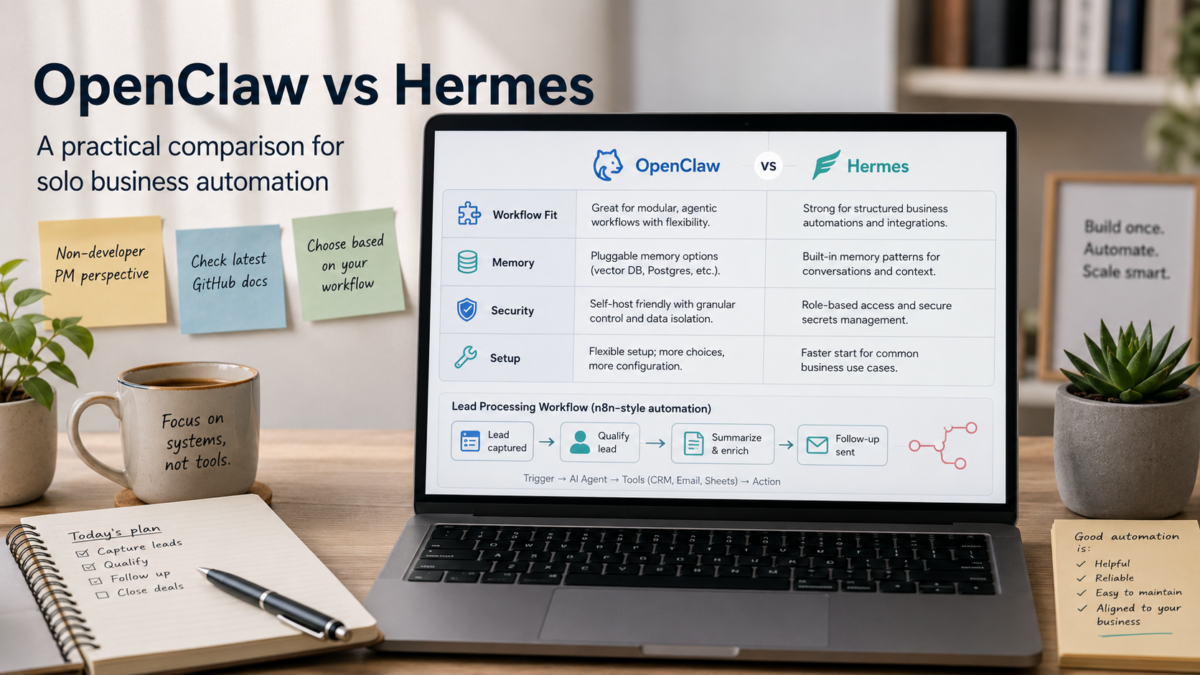
The core split isn’t about more features versus fewer—it’s about how each agent thinks and helps you work. Below is a quick-reference table for the decisions that affect most solo setups. After that, I’ll walk through what each difference means for a real small-business workflow.
| Capability | OpenClaw | Hermes Agent |
|---|---|---|
| Core Strength | Extensive integrations and a massive skill library | Self-improving memory that learns your procedures |
| Memory Model | Session- and skill-based context | Layered memory: notes, searchable history, procedural skills |
| Skill Creation | Pre-built skills from a community library; custom skills require definition | Automatically creates skills from successful workflows |
| Ease of Setup | Quick for general automation; many examples | Simpler for beginners on repetitive tasks; multi-agent patterns need more initial thought |
| Security Model | Highly scrutinized; documented CVEs; fast community patches | Seven-layer security model (less battle-tested at scale) |
| Best For | Multi-step coordination, integrating existing tools | Workflows that improve over time, overnight autonomous tasks |
|
💡 Important |
Setting Up a Simple Lead Processing Workflow: A Non-Developer Walkthrough
For a freelancer or small business owner, automating lead intake is a natural first project. I’ll walk through using Hermes Agent because its self-learning can turn repetitive qualification steps into a reusable skill without manual coding. If you prefer OpenClaw, you can swap in a similar approach—it will require more explicit skill definitions but offers broader integrations out of the box.
Prerequisites: an n8n instance (cloud or self-hosted) and a running Hermes Agent environment. Hermes can be deployed locally or on a small cloud VM. Check Hermes’ GitHub for current hardware recommendations; a modest server is typical for light workloads.
|
Setup Steps at a Glance |
- Deploy Hermes Agent
Clone the official Nous Research repository and follow the installation guide. Start Hermes in autonomous mode with a local model (e.g., Llama 3 or a compatible open model). Confirm the agent is listening on a local port with a simple curl test. - Create an n8n webhook to catch new leads
In n8n, add a Webhook node and set it to receive POST data from your contact form. For testing, you can use a dummy JSON body containing name, email, and a brief message. Turn on the workflow and copy the webhook URL. - Send lead data to Hermes for enrichment
Add an HTTP Request node after the webhook. In the URL field, point to your Hermes endpoint (e.g., http://localhost:5000/enrich). Set method to POST and include the incoming JSON as the body. Hermes will use its memory to look up similar past leads and return a qualification note. Use the node below to see a simplified request. - Set up a Hermes skill with a few examples
Before full automation, feed Hermes 5–10 sample leads manually with your preferred labels (e.g., “hot,” “needs follow-up,” “not a fit”). This gives the agent patterns to learn from. A sample training prompt is shown in the code snippet. - Test with a dummy lead and check the output
Manually trigger the n8n webhook with a test lead. Hermes should return a classification and a suggested next step within a few seconds. Verify the output is consistent. If not, review the agent’s logs and adjust the training examples. - Add error handling and a weekly review step
In n8n, add an IF node to check the HTTP response code. On failure, route to an email notification so you can intervene. Once per week, scan the agent’s skill library to review any new behaviors it has created and remove ones that don’t match your process.
Sample n8n HTTP Request configuration
{
  "url": "http://localhost:5000/enrich",
  "method": "POST",
  "body": {
    "name": "{{$json.name}}",
    "email": "{{$json.email}}",
    "message": "{{$json.message}}"
  },
  "headers": {
    "Content-Type": "application/json"
  }
}
Training prompt snippet for Hermes
Lead: Jane Smith – looking for bookkeeping services for a small café.
Label: hot – call within 24hrs

Lead: Mike – asked about monthly retainer but no budget shared.
Label: needs follow-up
Deciding Which Agent to Start With
The right first agent depends on how you work today and what you hope to automate first. Use the table below to match your primary use case to a starting point. After the table, I’ll mention how some solo owners combine both.
If you already use OpenClaw, adding Hermes later for memory-heavy tasks is a common pattern. The two communicate via the ACP protocol, so you can use OpenClaw to coordinate and Hermes to execute repetitive loops that learn over time. But start with one. Master it before introducing coordination overhead.
| Your Use Case | Start With | Why |
|---|---|---|
| Daily client email follow-ups that should improve over time | Hermes | Memory layer and self-created skills adapt to your phrasing |
| Multi-step workflow with existing tools (Airtable, Slack, Stripe) | OpenClaw | Broad integrations and pre-built skills |
| Experimenting overnight without writing any tool definitions | Hermes | Auto-skill creation from successful runs |
| You need a visual, community-vetted skill library | OpenClaw | 13,700+ pre-made skills, large Reddit base |
|
💡 Start small |
Checklist Before Committing to an AI Agent
Before you wire any agent into live client work, run through these practical checks. They come from the community’s most repeated cautions and my own mental checklist as I explore this space.
- Clone the official GitHub repo and read the latest README—hardware requirements change between releases.
- Check for recent CVEs if you plan to expose the agent to the internet. OpenClaw has publicly documented ones; Hermes has a seven-layer model but less adversarial scrutiny.
- Verify LLM compatibility: does your preferred model (local or API) work cleanly with the agent’s default tool definitions?
- Budget for cloud compute: review current VM pricing for your region.
- Set up a test environment before touching any client data—use dummy contacts and isolated APIs.
- Allocate time for debugging. Even the most mature agents need re-prompting or restarts occasionally.
- Have a fallback manual process for the first month in case the agent misclassifies a lead or sends a wrong email.
Frequently Asked Questions
Is Hermes Agent free to use?
Yes, both OpenClaw and Hermes are open-source and free to self-host. You will need to provide your own compute (local server or cloud VM) and your own LLM API keys or local models. Some managed hosting services for Hermes are emerging, but they come with separate pricing.
Can I use both OpenClaw and Hermes together?
Yes. Many experienced users run OpenClaw as the orchestrator (planning steps, coordinating tools) and Hermes as the execution specialist (fast, repeatable loops). They can communicate through the ACP protocol, as described by the community analysis on Kilo and Reddit.
Which agent is easier for a non-developer to set up?
Hermes may feel easier at first because it creates its own skills automatically and remembers context across sessions. OpenClaw has more community examples and pre-built skills, but you still need some comfort with JSON and command-line. Budget a weekend for either one, even with no-code helpers.
Does Hermes integrate with n8n?
Yes. Both agents expose HTTP endpoints, so connecting them with n8n’s HTTP Request node is straightforward. Use a simple JSON body to send data and parse the response inside your workflow.
What are the security risks when using OpenClaw for client data?
OpenClaw has had publicly disclosed CVEs, so always run the latest version and use isolated containers. Hermes was designed with a seven-layer security model, but it has not yet been tested at the same scale. For either agent, treat all client data as sensitive—don’t expose the agent directly to the public web without authentication, and regularly review log files.
Wrap-Up
OpenClaw and Hermes both make it possible for a solo business owner to hand off repetitive tasks to an AI agent that runs on your own terms. The real advantage isn’t that one is objectively better—it’s that you can start small tonight with a free clone and a test workflow. Next, pick the agent that aligns with your biggest time sink, spin up a test VM, and run the same two-day experiment I just described. Document what works and what doesn’t. Then consult the official GitHub discussions and independent comparisons to verify costs, security, and release notes before you commit. The goal is a repeatable assistant that earns its place in your stack—not more excitement than output.
Related Posts