You've probably seen the term vibe coding everywhere and wondered if it's just another hype cycle or something a solo business owner can actually use without a CS degree. The frustration is real: too many tools, unclear where to start, and the nagging fear that you'll break something you don't understand. This guide isn't a sales pitch—it's a practical walkthrough drawn from the latest available documentation and guides, showing you exactly what setup looks like and how to run a simple automation without writing code line by line. If I were setting this up myself for a freelance side project, here's what I'd check first.
What Vibe Coding Really Means (and What It Doesn't)
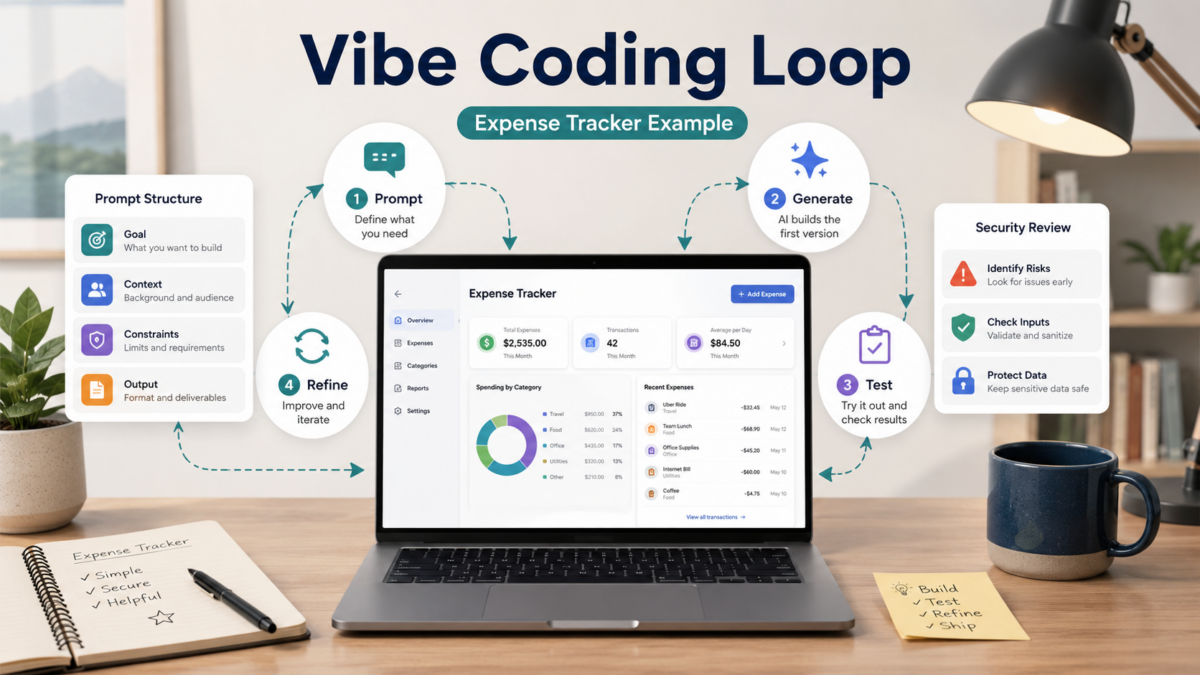
Google Cloud's latest definition (updated March 2026) describes vibe coding as a loop: you describe what you want, the AI generates code, you run it, see what happens, then give feedback to refine—repeating until it works. It's not a one-shot magic bullet. Andrej Karpathy coined the term in early 2025, and by 2026 the practice has matured enough that even a non-developer PM like me can follow a structured process. From the guides I read, the core pattern isn't 'AI does everything'; it's 'you steer the AI through conversation, testing, and iteration.' That means you still need to think clearly about what you're building and how to test it.
One critical exception: if you're building something that handles customer data, payments, or anything security-sensitive, vibe coding alone probably isn't enough. Several experienced voices note that most generated code needs security review and manual hardening before production (Valletta Software, April 2026). That's not a reason to avoid it—just a warning that I'd take seriously if I were putting a tool in front of paying clients.
|
💡 Realistic expectation |
Why This Matters for Freelancers and Solo Owners Right Now
A TechRepublic cheat sheet published in May 2026 calls vibe coding the 'latest AI trend' and outlines the planning, testing, and security checks that separate successful builds from headaches. That tells me this isn't just a flash-in-the-pan: the conversation has shifted from 'can AI write code?' to 'how do I do this responsibly?' For solo business owners, that shift means the barrier is lower than ever to create custom automations—tools that used to require a paid developer for even a simple internal dashboard or automated email flow.
If you're a freelancer juggling client work, the ability to spin up a quick expense tracker or lead capture form in an afternoon, without hiring anyone, changes your cost structure and speed. The current wave of AI coding assistants (many accessible through a browser) makes it feasible, but you still need a methodology. That's what this guide focuses on.
Key Benefits, Limitations, and What the Latest Guides Agree On
Across the resources I looked at, three benefits stand out for non-developers: you can go from idea to working prototype incredibly fast, you don't need to memorize syntax, and you can experiment without deep technical training. The Google Cloud article emphasizes that the loop includes testing and refining, which is exactly how I'd approach building something for my own business—iteratively, with constant reality checks.
On the limitation side, hallucinations (the AI inventing plausible but wrong code), security gaps, and scaling issues are the most repeated. A Udemy course outline for non-coders mentions managing hallucinations, recognizing when developer handoff is needed, and using prompt templates. That aligns with what the Valletta Software guide says: success depends on how you prompt, what you review, and when you stop relying on AI alone. For a solo business owner, I'd interpret that as: vibe coding is fantastic for internal tools and experiments, but anything client-facing or data-sensitive needs an extra layer of human review.
| What Vibe Coding Excels At | Where You Need Extra Caution |
|---|---|
| Prototyping a dashboard or simple web app | Storing user passwords or payment data |
| Automating repetitive spreadsheet tasks | Building a public API without security review |
| Creating a quick internal expense logger | Scaling to hundreds of concurrent users |
| Learning how code works by tinkering | Deploying to production without testing edge cases |
From Setup to Running Automation: A Step-by-Step Expense Tracker Example
Let's walk through a concrete example that a freelancer might actually build: a simple expense tracker that logs entries and could later tie into a spreadsheet. I'm assuming no prior coding setup. This isn't a tutorial I've personally published, but the steps follow the structured vibe coding process outlined in the latest guides.
- Pick an AI coding tool and environment: You'll need a tool that can generate and run code. Options include ChatGPT (with code interpreter), Claude (with artifacts), or a browser-based IDE like Replit with its AI assistant. For this walkthrough, I'd use a web-based IDE so you don't install anything. If I were setting this up, I'd open Replit (free tier), create a new HTML/CSS/JS repl, and turn on the AI assistant.
- Write a clear, step-by-step prompt: Don't just say 'build an expense tracker.' Break it down: 'Create a single-page web app with a form to add an expense (amount, category, date). Display a list of added expenses below the form. Store data in browser local storage so it persists on refresh. Add a simple total at the bottom.' That structured approach, recommended in the Valletta guide, gets better results than vague requests.
- Generate, test immediately, and log what breaks: Hit generate and run the app. Add a few expenses. Check if the list updates correctly. If something fails—say the delete button doesn't work—describe the issue to the AI: 'The delete button next to each expense doesn't remove the item. Fix it so clicking delete removes that entry and updates the total.' Run again. Keep iterating until the core feature is solid.
- Add a lightweight automation layer: To make this more than a toy, connect it to Google Sheets via a simple API (you'll need a Google Cloud project and an API key—use the placeholder approach and never hardcode real keys). Modify your prompt: 'Add an Export to Sheets button. When clicked, it should send all stored expenses as a POST request to a Google Apps Script endpoint. I'll replace the endpoint URL later.' This step simulates a real automation workflow. You'll test with a placeholder first, then swap in the real URL once you've set up the Apps Script following Google's official guide.
- Refine error handling and UI niceties: Once the automation works, tell the AI: 'Add a loading spinner while the export is in progress, and show a success or error message. Also add basic form validation so no empty expenses are submitted.' This iterative prompt-refine cycle mirrors real software development, and it's where vibe coding shines—you're guiding the finish without writing the logic yourself.
- Share a test link and use it yourself for a week: Most online IDEs let you share a runnable link. Use the expense tracker for your own business for a few days. Note any annoyances, then go back to the AI and describe the improvements. That real-world testing is what separates a demo from a tool you'll actually use. If you find a bug you can't fix, that's your signal to involve a developer, not a failure.
How to Decide Where Vibe Coding Fits in Your Solo Workflow
Not every problem needs an AI-written app. From the guides, I'd apply vibe coding primarily to internal tools, prototypes, and one-off automations that reduce your manual toil. For a freelancer, that might be a client project tracker, a quick invoice generator, or a meeting notes summarizer. For a small local business, it could be an appointment reminder that pulls from a Google Calendar.
Before you start, ask: Is this app handling sensitive data? Yes → plan for a developer review. Will it face the public internet? Yes → add security checks before launch. Is it something I'd pay someone to build? Yes → vibe coding might save you that cost if the output stays internal. If you're uncertain, start with a completely internal tool like the expense tracker we just walked through. That way, a mistake won't affect customers or violate compliance rules.
|
💡 Decision shortcut |
Checklist Before You Consider It Done — Common Pitfalls
Based on the common mistakes surfaces in the guides, here's a quick checklist I'd run through before I start relying on any AI-generated tool.
- Did you test with real but non-sensitive data to catch edge cases?
- Have you removed all hardcoded API keys and used environment variables or a secure config?
- Does the UI handle errors gracefully (network failures, empty data, validation)?
- If you used third-party APIs, did you set up rate limiting and error handling?
- Have you read the generated code for anything that looks suspicious—especially external calls you didn't intend?
- Is there a backup of your data, and can you revert to a previous working version?
|
💡 Security reminder |
Frequently Asked Questions
Do I need any coding experience to start vibe coding?
No, but you do need patience and a willingness to test, break, and describe problems clearly. The latest guides emphasize that good prompting and structured thinking matter more than knowing syntax. Start with a small internal tool and learn from the mistakes.
Can I build a client-facing web app with vibe coding alone?
You can prototype one, but before customers use it, you'll need security hardening that typically requires a developer's review. Use vibe coding to get 80-90% there quickly, then budget for professional help on the last mile if the app handles sensitive data or payments.
What's the biggest mistake non-developers make with vibe coding?
Over-trusting the first version. Many beginners stop testing after the initial success, but real-world usage surfaces edge cases. The structured loop from the Google Cloud guide—describe, execute, observe, refine, repeat—is essential.
Is vibe coding completely free?
Many AI coding assistants offer free tiers, but you might hit usage limits, especially if the tool runs the code for you. The platforms themselves may have free starter plans, but for regular use, you might eventually need a paid plan. Always check the current pricing before you commit.
How do I know when to stop vibe coding and bring in a developer?
If you encounter a bug you can't describe clearly, notice sluggish performance under load, or realize the app processes sensitive data in a way you don't fully understand, that's a signal. Don't force it—handoff is part of the process.
Sources and References
- Google Cloud – What Is Vibe Coding (Last Updated March 2026)
- Valletta Software – How to Vibe Code in 7 Steps (April 2026)
Wrap-Up
After reading this, the most useful next step is to try the expense tracker example using a free, browser-based IDE—adapt it to your own business need, whether that's logging mileage, tracking freelance hours, or cataloging client requests. Keep the official Google Cloud and Valletta guides open as you work; they fill in details I didn't repeat here. Finally, if your first attempt feels clunky, remember that the core skill is describing exactly what went wrong—that's the real value of vibe coding. Bookmark the versions that work, and don't hesitate to scrap and restart with a better prompt.
