As a PM and non-developer, I know the buzz of finding an automation tool that could free up hours each week — followed by the frustration of unclear costs and setup that feels more like sysadmin work than building solutions. Many freelancers and solo owners I talk to want to connect a few apps without learning Docker or decoding per-user pricing models. This guide walks through the exact steps to get started with n8n Cloud, from signing up to a simple, working workflow, so you can judge whether it fits your business before committing time or money.
Quick Summary: What You Get with n8n Cloud and What to Watch Out For
n8n Cloud is the managed version of the open-source workflow automation tool, meaning you can sign up for a free trial directly at their cloud platform — no server setup required. You can visually connect apps like Google Sheets, Slack, email, and AI services, which opens up a lot of possibilities without writing code. However, the free trial comes with limits on execution volume and active workflows, and once it ends you’ll need a paid plan or you’ll have to switch to the self-hosted community edition.
For freelancers testing a few automations, this is the fastest way to see results. Just don’t forget to check the exact trial length and what’s included — the official learning path is a good place to scope the current offer before you hand over payment details.
|
💡 Before you commit |
Why n8n Cloud Matters for Small Business Owners Right Now
AI automation is moving from a nice-to-have to everyday toolkit for solo business owners, and many are looking for reliable ways to integrate apps without hiring developers. n8n stands out because it is open-source, which helps avoid the per-user price jumps that can hit teams on other platforms. The cloud option eliminates the barrier of setting up and maintaining a server, so you can explore automation in an afternoon — not over a weekend of debugging.
There is now a growing library of step-by-step tutorials and courses centered around n8n. The official learning path, for example, walks you through building real-world workflows and offers text and video courses. While you’ll still face a learning curve, the current cloud product is mature enough to be considered alongside Zapier or Make for a freelancer who values control and cost transparency.
Key Conditions, Costs, and Benefits You Should Verify
Before you create an account, it helps to understand what the cloud plan includes and how it stacks up against self-hosting. n8n Cloud handles hosting, updates, and basic security for you, but your monthly workflow execution limit will be tied to the plan you pick. Exact pricing and trial details are shown on the sign-up page; as of this writing, a free trial is available, and after that you’ll pay a recurring subscription.
The table below compares cloud and self-hosting in a way that matters to a solo operator. Keep in mind that if you only run a handful of automations, the convenience of cloud likely outweighs the small recurring cost. But if your volume grows or you need to keep sensitive data inside your own infrastructure, the self-hosted route might be more suitable.
| Feature | n8n Cloud | Self-Hosted (Community Edition) |
|---|---|---|
| Setup time | Minutes — just sign up | Hours — requires Docker/npm and basic server knowledge |
| Maintenance | Fully managed by n8n | You manage updates, backups, and uptime |
| Cost | Free trial, then monthly subscription (check current pricing) | Free software; you pay for server resources (e.g., $6–$20/month on a VPS) |
| Scalability | Limited by your plan tier | Scales with your server hardware |
| Tech skill required | Low — visual editor steps | Medium — Docker basics and API handling |
Step-by-Step: From Sign-Up to Your First Automation
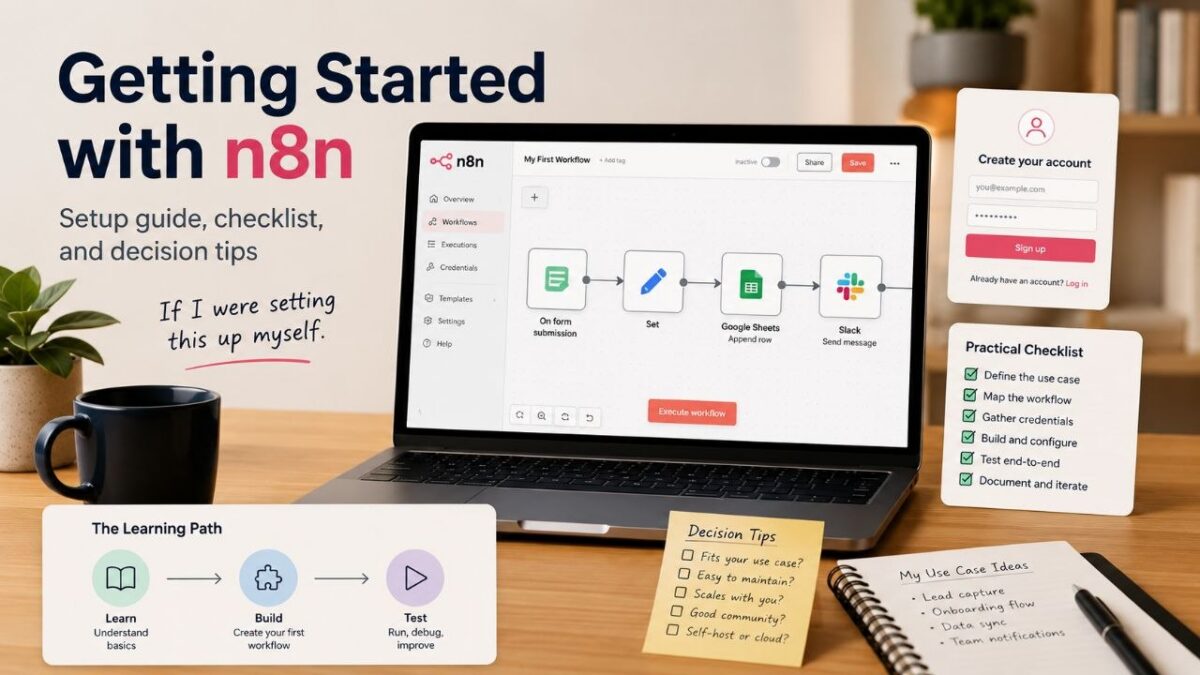
If I were setting this up myself for a small client project, I’d pick one simple, high-value use case to build first — like getting an alert whenever a new Google Form comes in. Here is the path I’d follow to go from zero to a working workflow in under an hour.
- Sign up and start your trial: Go to the n8n Cloud app and create an account. Once inside, you’ll land on the workflow overview page. Start the free trial when prompted — you won’t need a credit card immediately, but keep an eye on the trial expiration date shown in the dashboard.
- Create a new workflow and choose a trigger: Click ‘+ Workflow’ to open the editor. Drag the ‘Webhook’ node onto the canvas. This node will generate a unique URL; any data you send to that URL (for example, a test POST from a form) will start the automation.
- Add an action node that matters to your business: Let’s say you want new entries added to a Google Sheet. Search for the Google Sheets node, drag it after the webhook, and select ‘Append Row’. Authenticate with your Google account (a simple OAuth pop-up). Map the incoming webhook data to the correct spreadsheet columns.
- Test the workflow with real sample data: Click ‘Listen for test event’ in the webhook node. Then, from another browser tab or a tool like Postman, send a test request to the webhook URL with a sample payload. If everything is wired correctly, you’ll see the node turn green and the test row will appear in your sheet.
- Activate and monitor the first run: Once the test passes, click ‘Activate’ in the top-right corner. The workflow will now run automatically whenever data hits the webhook. Check the execution history tab to make sure each run completes without errors. If something breaks, n8n will show a red node and an error description — most early issues come from mismatched data fields.
|
💡 Quick help |
Deciding If n8n Cloud Fits Your Solo Business Workload
Not every freelancer needs the cloud plan, and not every project is suited for a managed service. I’d make the call based on three things: how many automations you plan to run, which integrations you rely on, and how comfortable you are with a platform that handles your data.
For a solo business owner, n8n Cloud makes the most sense when you run a few low-to-medium volume workflows and you value saving time over absolute cost optimization. If you need to process hundreds of thousands of rows or integrate with local databases, the cloud plan’s limits may frustrate you, and the self-hosted edition might be a better fit. Similarly, if your automations handle client-sensitive financial or health records, you’ll want to verify the cloud’s data residency and security posture before proceeding — the official n8n security docs are the place to check.
Checklist and Risks Before You Automate
Before you flip the switch on a production automation, run through these items. They come from real-world snags I’ve seen small teams hit when trying to move fast.
- Note the trial end date and the monthly execution cap of the free trial and the cheapest paid plan.
- Build and test one whole workflow end-to-end with sample data to confirm all node connections work.
- Confirm that the third-party apps you need (email, CRM, calendar) have officially supported n8n nodes — if not, you may need to write a custom HTTP request node, which adds complexity.
- Audit the data you’ll send through n8n Cloud. Avoid placing unencrypted sensitive information in workflows where you can’t control where it’s stored.
- Set a calendar reminder for one day before the trial ends so you can decide to upgrade or export workflows for self-hosting.
|
💡 Biggest catch |
Frequently Asked Questions
Is n8n Cloud free?
It starts with a free trial. After the trial, you’ll need a paid subscription to keep using the cloud platform. The exact trial length and the features included are shown on the sign-up page, so it’s best to check there before starting.
Do I need to know how to code?
Basic automations are built with a visual drag-and-drop editor, so you don’t need to write code for common tasks like forwarding emails or logging form entries. More advanced flows may require some understanding of APIs and JSON, but you can learn as you go with the official tutorials.
Can I switch from cloud to self-hosting later?
Yes. You can export your workflows from n8n Cloud and import them into a self-hosted community edition running on Docker or npm. This gives you a safety net if you outgrow the cloud plan or want to avoid monthly fees.
What kind of simple automation should I build first?
Start with something like new form submissions saved to Google Sheets, or a Slack notification when a specific email arrives. These low-risk flows let you learn the editor and test the plan limits without touching critical processes.
How secure is n8n Cloud?
n8n Cloud is a managed service that handles server‑level security and updates. However, you are still responsible for the data you pass through your automations. Review n8n’s security documentation and avoid sending highly sensitive data in an unencrypted manner unless you’ve verified compliance with your own requirements.
Wrap-Up
If you’re a freelancer, solo founder, or side‑project builder looking to cut down on repetitive tasks without getting buried in setup, n8n Cloud gives you a low‑risk way to test workflow automation. Start with the free trial, follow the official quickstarts to build one simple workflow, and then evaluate whether the plan’s cost and limits match your long-term needs. Next, I’d check the n8n learning path and community forums for an existing template that fits your use case — you may not have to build from scratch.